Common Blockbench issues/errors
Below are common issues encountered while using Blockbench with the Geckolib plugin.
I don't have the Display tab
If you don't see the Display tab in the top right section next to Paint, there are a few possible problems:
| Problem | Solution |
|---|---|
| Your Blockbench model is not a GeckoLib model | Convert the model to a GeckoLib model |
Your GeckoLib model type is not set to Item | Change the model type in the File -> Project window to Item |
| You do not have the GeckoLib plugin installed | Install the plugin |
I can't find GeckoLib Animated Model in the New model dropdown
If GeckoLib Animated Model doesn't show up as an option in the New model dropdown menu, you do not have the GeckoLib plugin installed.
See the GeckoLib Plugin Setup page for installation instructions.
I get an invalid format error when opening an older model
If you get the below error when opening an older GeckoLib model, you need to convert the model to the latest format.
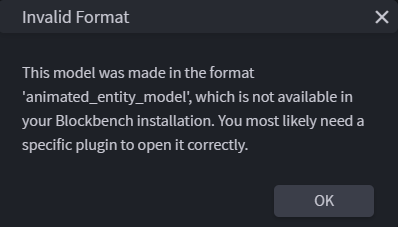
See the Converting an existing model section for more information.